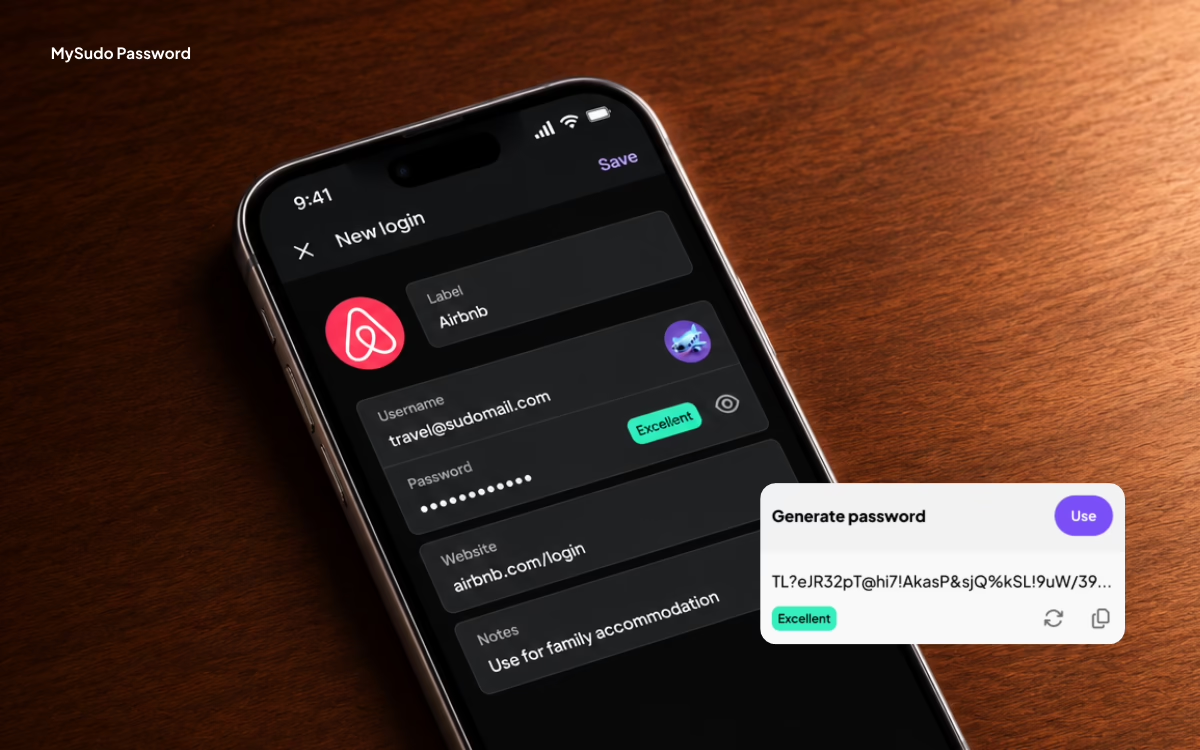
Looking for a password manager or an alternative to 1Password, Bitwarden or LastPass? The newly released MySudo Password combines password management with privacy-focused digital identities, to give you a secure way to manage your passwords while controlling more of the personal information you share online.
The latest addition to the popular MySudo Suite of privacy and identity protection tools, MySudo Password lets you securely store passwords, passkeys, payment details and other sensitive information, organized by the Sudo digital identities you use online. That means you can keep the accounts you use for shopping, banking, travel, dating, and other parts of your life separate within the password manager.
How is MySudo Password different from other password managers?
A password manager gives you a secure place to store and manage your passwords and other login details that you need to log in to your online accounts. MySudo Password does that too but adds another layer of organization.
Instead of simply keeping all your logins together in one vault, MySudo Password lets you organize your logins and other information by the Sudo identity you use with each account.
Your password manager keeps your login information secure, while your Sudo identity lets you control the personal information you share with each service.
For example, you might use one Sudo for shopping, another for travel, and another for online dating. MySudo Password keeps the login information associated with those accounts together within the relevant Sudo.
This gives you a simpler, secure way to protect your sensitive information and reduce how much of your personal information you share with every company and service you use.
Want to learn more about Sudos before you go any further? Read our deep dive: What is a Sudo? Your alternative identity for online shopping, signups, and privacy
Why does identity compartmentalization matter?
Using the same personal email address, phone number, and other identifying information across dozens of accounts makes it easier for companies, advertisers and data brokers to connect those accounts to you.
Identity compartmentalization takes a different approach. You use separate identities for different parts of your life, making it harder to connect your accounts and activity.
Identity compartmentalization is the point of the Sudo. If one account is affected by a data breach, the information associated with that Sudo is separated from the information you use elsewhere. That can help limit the amount of personal information exposed or connected through a single account.
Key features of MySudo Password
MySudo Password is the double duty password manager designed to protect your logins and give you total control over what you share online. Use it to:
Organize passwords by Sudo identity
Keep logins, passkeys and other sensitive information organized according to the Sudo identity you use with each account.
Autofill and autosave
Fill login details quickly when you sign in and automatically save new credentials when you create an account.
Generate strong, unique passwords
Create a different, hard-to-guess password for every account to reduce the risk of password reuse.
Create and store passkeys
Use passkeys for supported accounts for passwordless sign-ins.
Find weak or reused passwords
Identify passwords that could put your accounts at greater risk and replace them with stronger, unique credentials.
Sync across devices
Keep your password vault in sync across your mobile and desktop.
MySudo Password is password manager and identity protection in one
A traditional password manager helps answer the question: How do I keep track of all my passwords securely? MySudo Password adds another question: How do I keep track of which identity I’m using with each account?
That’s an important point when you want to reduce the amount of personal information you share online. For example, instead of giving an online retailer your personal email address and phone number, you can use a Sudo created specifically for shopping. Your MySudo Password vault can then keep your login credentials for that retailer’s site stored under that Sudo.
The result is a password manager designed around both credential security and privacy.
Security and privacy of MySudo Password
MySudo Password is designed with privacy and security built into its architecture:
- End-to-end encryption (E2EE): Your data is encrypted locally on your device before it ever hits the cloud.
- Zero-knowledge guarantee: Only you hold the key to your vault. Neither Anonyome Labs nor any third party can ever read your saved credentials or personal data.
MySudo Password web extension
MySudo Password is designed to work on your desktop browser as well as mobile.
MySudo Password web extension is available for Chrome, Microsoft Edge, Safari, and Firefox, so you can access MySudo Password and autofill your Sudo information from your desktop browser.
Why use a password manager?
Your password is often the first line of defense for your online accounts. If someone gets hold of your password, they may be able to access your account and the personal information stored in it.
Using the same password for multiple accounts makes the problem worse. If one company has a data breach and your password is exposed, bad actors may try that same password on your other accounts.
Verizon’s 2025 Data Breach Investigations Report found that stolen passwords and other login details were involved in 88% of data breaches caused by attacks on websites and web applications.
A password manager helps protect you by storing your passwords securely and making it easy to use a different, strong password for every account. You don’t have to remember them all yourself.
MySudo Password takes this a step further by connecting your passwords to your Sudo identities.
Your password manager keeps your login information secure, while your Sudo identity lets you control the personal information you share with each service. Instead of giving every company your primary email address, phone number, or payment details, you can use different Sudo information for different parts of your life.
That means you can keep your passwords secure and have more control over how much personal information you share online.
Start today. Get the new MySudo Password.
Frequently asked questions
What is MySudo Password?
MySudo Password is a privacy-focused password manager that lets you securely store passwords, passkeys, payment details, and other sensitive information. It also lets you organize that information around the Sudo digital identities (from the MySudo privacy app) you use online.
How is MySudo Password different from a regular password manager?
MySudo Password combines password management with identity compartmentalization. In addition to storing your credentials securely, it lets you organize them according to the Sudo identity you use with different accounts.
Can MySudo Password generate strong passwords?
Yes. MySudo Password can generate strong, unique passwords for your online accounts, helping you avoid reusing the same password across multiple services.
Does MySudo Password support passkeys?
Yes. MySudo Password supports creating and storing passkeys for compatible accounts.
What browsers does MySudo Password support?
MySudo Password web extension supports Chrome, Microsoft Edge, Safari, and Firefox.
Can I use MySudo Password with my Sudo identities from MySudo app?
Yes. MySudo Password is designed to work with Sudo digital identities, allowing you to keep your account credentials and Sudo information organized together.
Is MySudo Password available on iPhone and Android?
Yes, MySudo Password is available for both iPhone and Android, plus as a web extension for Chrome, Microsoft Edge, Safari, and Firefox.
Is MySudo Password a good alternative to 1Password or Bitwarden?
MySudo Password provides the core password-management features you would expect from a modern password manager, including password storage, password generation, autofill, autosave, and passkey support. Its key difference is that it combines password management with Sudo digital identities and identity compartmentalization.
If privacy and control over the personal information you share online are important to you, this combination makes MySudo Password a powerful alternative to other password managers.