How exposed are my phone number and email online? What do companies have on me? Have I been caught in a data breach? Am I at risk of identity theft and fraud?
Finding out where your personal information is exposed and taking back control of it are total power moves in today’s risky digital world.
Now you can get the answers you need with the free exposure scan in MySudo.
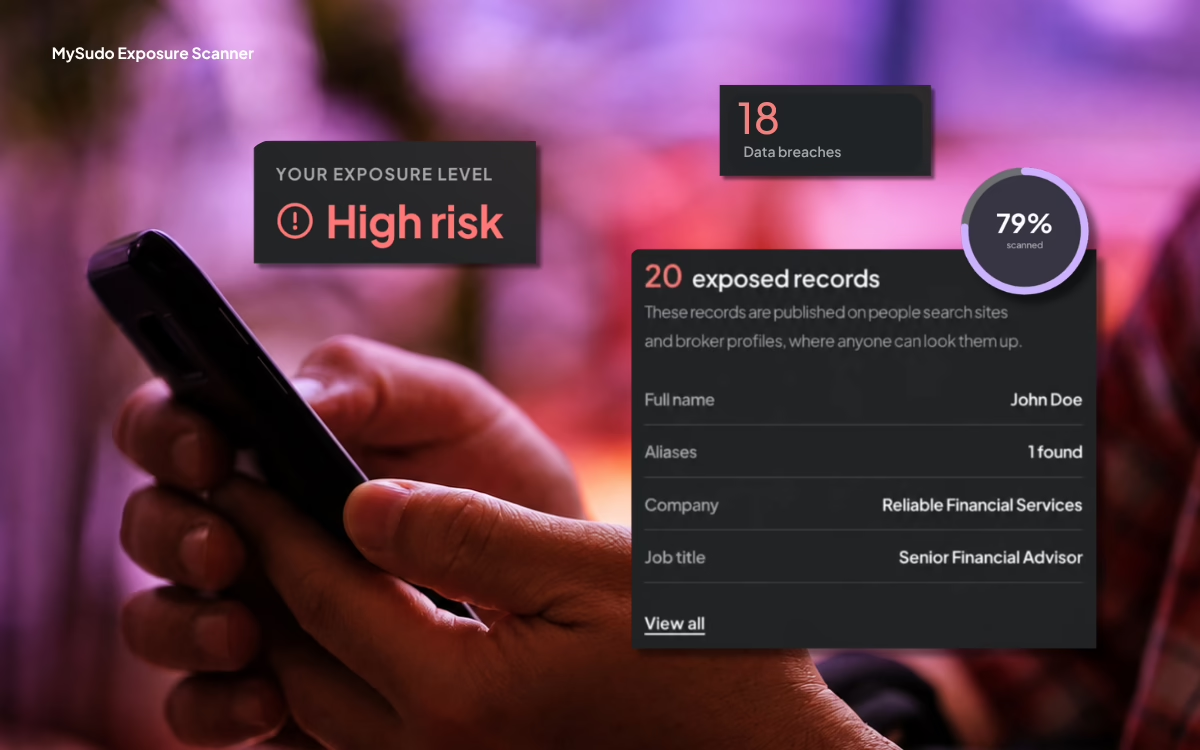
The MySudo exposure scan tells you where your personal information is exposed online, identifies whether it’s been caught in a data breach, and gives you a personalized privacy exposure level, so you can start to take back control.
For a long time, MySudo has given you alternative digital identities to use instead of your own. Now the exposure scan shows you exactly what you need to protect.
Why protect your phone number and email?
Virtually every organization, from data brokers, tech platforms and financial institutions to healthcare providers, telecoms, governments, retailers and employers, collects your personal information to deliver services, meet legal obligations, target advertising or monetize user data. Once your information is exposed, it’s really hard to control it, which opens you up to spam, scams, identity theft, and other data abuse.
If you’re like most people, you probably share your phone number and email address constantly, thinking it’s harmless. But really, they’re two of your main digital identifiers. Data brokers collect these details and information linked to them from public records, loyalty programs, websites and other sources to build detailed profiles of your habits and preferences. They then sell or license this information to other organizations, which can use it to target advertising, personalize offers, and make inferences that influence the prices, products, and opportunities presented to you.
Then there are data breaches. When an organization is hacked, personal information can be stolen and later exposed, traded or offered for sale on criminal marketplaces, including parts of the dark web. With AI rapidly making phishing and other social engineering attacks more sophisticated, reducing unnecessary exposure of your personal contact details is a wise move.
See what information is out there, then take back control
Once you’ve run the MySudo exposure scan to see your exposure level, it’s time to take back control.
For this, you put your Sudo digital identities (also in the MySudo app) to work. You can have up to nine Sudos and assign them to all sorts of things, like shopping, travel bookings, house hunting, selling secondhand stuff, rideshare and food delivery, and dating apps.
Each Sudo can have its own phone number, email address, virtual card, secure comms handle, and private browser so you can go online without exposing your personal contact details. Using Sudos means you’re no longer putting your personal information at risk. You’re switching it out for alternative contact details and breaking the data trail that leads to the profiling, data breaches, spam, and scams.
Get your free MySudo exposure scan results in seconds
- Download MySudo – Get the popular privacy and identity protection app for iOS or Android.
- Open the exposure scan – You’ll find it on the app homepage.
- Enter your phone number and email – Provide the contact details you want to check.
- Verify ownership – Complete a quick verification step to confirm the information belongs to you.
- Get your exposure results – The scanner checks public data sources and breach databases to show how exposed your identity is online.
- Set up your Sudos – Get to work setting up your Sudos to meet your real-life privacy needs.
- Use your Sudos everyday – You’ll be surprised at all the services that happily take a Sudo instead of your personal info.
FAQs MySudo exposure scan
What is the MySudo exposure scan?
The MySudo exposure scan is a free tool that shows how exposed your personal information is online. It checks publicly available data sources and known data breaches using your phone number and email address, then gives you a personalized privacy score.
What does the MySudo exposure scan check?
The exposure scan checks your phone number and email address against publicly available information and breach databases to identify information associated with your digital identity and potential exposure.
How do I get a free privacy scan?
Download the MySudo app for iOS or Android, open the exposure scan, enter your phone number and email address, and verify that you own them. The scan will then generate your privacy score.
What is the privacy exposure level?
Your privacy exposure level gives you a snapshot of how exposed your personal information is online. It helps you understand your current level of digital exposure so you can take steps to protect your personal information.
Can I protect my phone number and email address with MySudo?
Yes. MySudo lets you create up to nine separate digital identities called Sudos. Each Sudo can have its own phone number, email address, and virtual card, allowing you to use alternative contact details instead of sharing your personal ones.
Does MySudo remove my personal information from the internet?
The exposure scan helps you understand where your personal information is exposed, while Sudos give you alternative identity information to use going forward. Using separate phone numbers and email addresses can help reduce the amount of personal information you share and limit the data trail connected to your personal identity.